

Watch the tour
A quick walkthrough of the new layout, the top toolbar, and where things have moved.Agent Studio new layout — guided tour (3 min)
What’s different
Related settings are now grouped together, so you spend less time jumping between sections. The sidebar goes from 29 pages down to 16, and the old Build, Channels, and Configure groups have been replaced with sections that match the task at hand.The new top-level sections
The previous Build / Channels / Configure top-level groups are gone — every page that lived under them now lives in one of the sections above.
Where common features moved
If you have muscle memory for the old sidebar, this is where to look now:Agent persona and rules
Agent persona and rules
Was: Build > Agent
Now: Behavior > General
Knowledge topics (FAQs)
Knowledge topics (FAQs)
Was: Build > Knowledge > FAQs
Now: Knowledge > FAQs. External sources are under Knowledge > Sources (formerly “Connected Knowledge”).
Variants
Variants
Was: Build > Variants
Now: Knowledge > Variants
Voice settings
Voice settings
Was: Channels > Voice > Voice configuration, Audio management, Response control, Speech recognition
Now: All under Voice. Common settings are at the top; less-used options are under Voice > Advanced.
Call handoffs
Call handoffs
Was: Build > Call handoffs
Now: Voice > Handoffs
Phone numbers and telephony
Phone numbers and telephony
Was: Configure > Numbers
Now: Voice > Numbers
SMS / message templates
SMS / message templates
Was: Build > SMS
Now: Voice > Message templates. SMS templates sit under Voice because they’re usually triggered from voice handoffs and follow-ups.
Testing
Testing
Was: Build > Test suite
Now: Testing — a dedicated top-level section with Tests (the test list) and Test runs (run history).
Behavior advanced settings
Behavior advanced settings
Was: Various places under Configure > General and Channels > Voice configuration
Now: Behind the Advanced settings button in Behavior. Includes safety filters, phrase filters, and runtime configuration.
Real-time configuration
Real-time configuration
Was: Build > Real-time configuration / Configuration builder
Now: Real-time config. The schema and data tabs are unchanged.
Smart Analyst
Smart Analyst
Was: Analytics > Smart Analyst (standalone top-level page)
Now: Part of Wren. Same questions, same answers — just open Wren and ask. See Analyze conversations.
Metrics and post-call reporting
Metrics and post-call reporting
Was: Configure > Metrics, Configure > Post-call reporting
Now: Custom metrics via the Metrics button on the Analytics page, and post-call extraction with
prompt_llmDashboards
Dashboards
Was: Configure > Dashboards
Now: Analytics > Dashboards
API integrations
API integrations
Was: Configure > APIs
Now: Integrations > API integrations
Project settings, users, API keys
Project settings, users, API keys
Was: Configure > General, User management, API keys
Now: All under Account
Recordings, transcripts, exports
Recordings, transcripts, exports
Was: Configure > Call data
Now: Settings > Call data
Removed
- Agent Analysis — per-call diagnosis is now in Conversations > Diagnosis; aggregate trends are in Dashboards and by asking Wren.
- Project history — version history and diffs are now on the Deployments page. See Compare changes.
- Luzmo dashboards — replaced by Standard, Safety, and Custom dashboards.
- Add/view numbers — removed from the toolbar. Manage numbers under Voice > Numbers.
Old URLs still work
Every page in the old sidebar redirects to its new location, so existing bookmarks, links in old emails, and links in your help-desk macros continue to work. You don’t need to update anything urgently.Reverting (temporary)
If you need the old sidebar while you migrate internal docs or run training, use the New layout toggle at the bottom of the sidebar to switch back.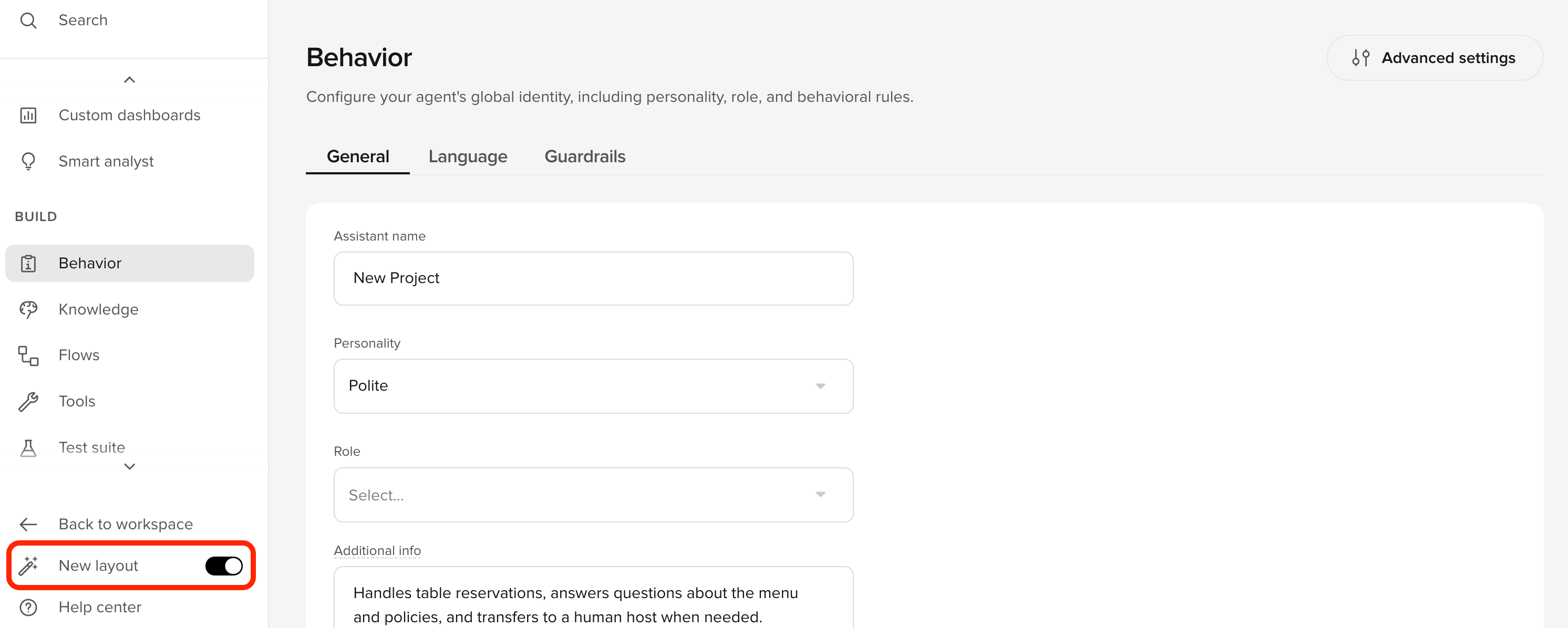
The New layout toggle at the bottom of the sidebar
Questions?
- Open Wren and ask “where do I find …?” — it’ll point you to the right page.
- Or reach out to your account manager or the customer Slack channel.