

Lesson 3 of 6 – Time to teach your agent something useful. You’ll create a simple topic that answers one question – like “what time do you close?” – in both Chat and Call.
What “simple” means
- Simple topics
- Not simple
- Completes in one turn
- Requires no clarification
- Triggers no actions
- Works the same way in Chat and Call
If a topic needs any of those features, it should be implemented as a complex topic instead. These will be covered in more detail in Level 2: Advanced of the PolyAcademy.
Is your idea a simple or complex topic?
Use this decision tree before writing anything:Check your understanding
Before you start: define your intent
Answer these questions before creating the topic:- What is the exact question being answered?
- Can a human answer it in one short response?
- Can users reasonably phrase this question in several different ways?
- “What time do you close?”
- “What time do you close and do you have holiday hours?”
Step 1: Choose a precise topic name
The topic name is the strongest signal for retrieval. Good topic names:- Describe one intent
- Are specific, not general
- Use
snake_case
closing_timeparking_costpet_policy
infogeneralshop_questionsmisc
Step 2: Write sample questions
Sample questions teach the retriever how users phrase requests. As a baseline, aim for at least 3 sample questions per topic. If the topic is broad or users phrase it in many different ways, include more – up to 20. Add variations that reflect real speech. Include:- Short questions
- Polite phrasing
- Informal or incomplete phrasing
- Call-style filler words
- Different sentence lengths
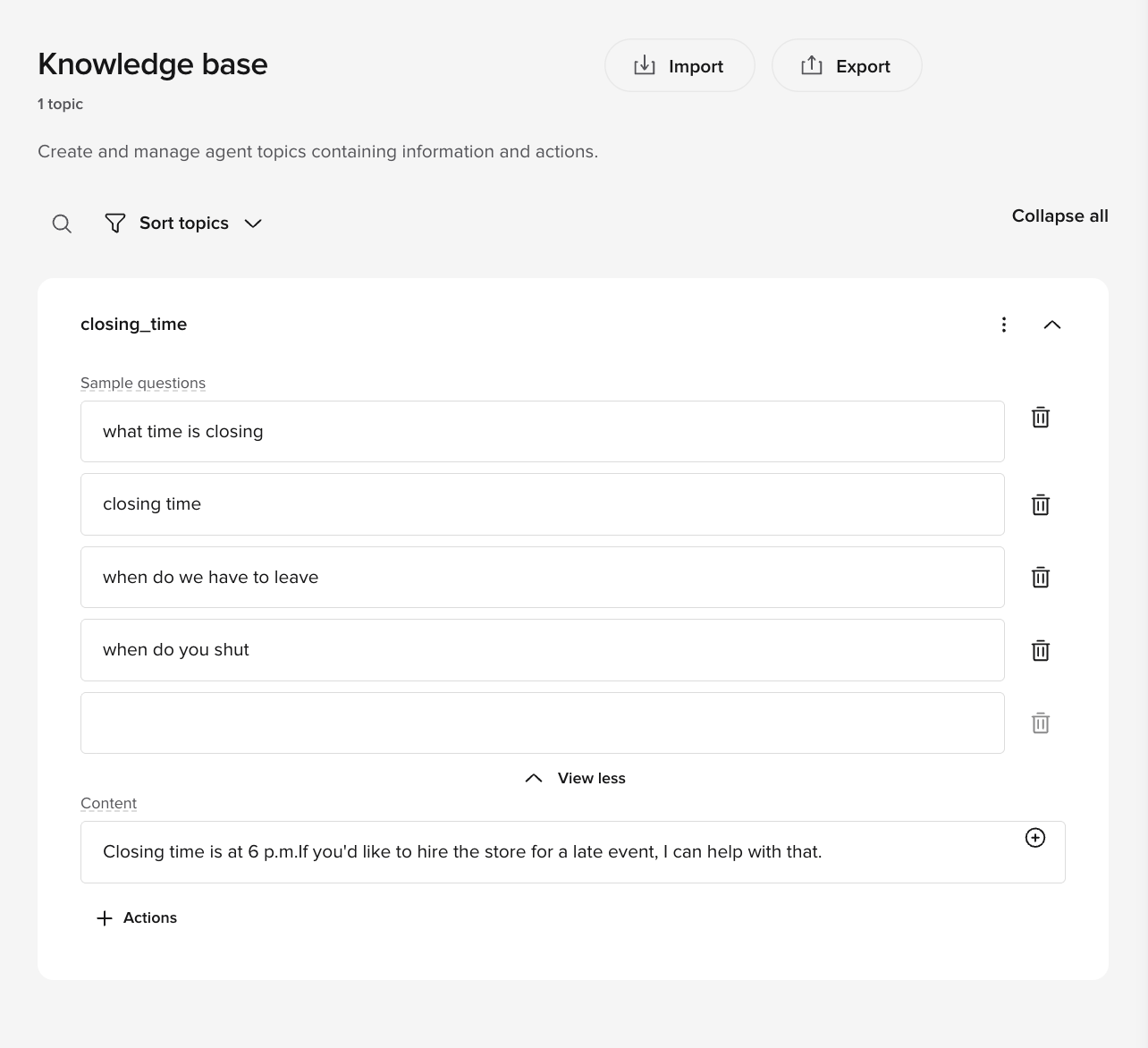
closing_time sample questions
- what time is closing
- closing time
- when do we have to leave
- when do you shut
- what time do we need to be out by
- uh what’s the closing time
- Repeating the same sentence with small wording changes
- Writing marketing-style language
- Including answers
How retrieval works
The retriever compares the user’s utterance to the topic Name, Sample questions, and Content to find the closest semantic matches. The top matches are then sent to the LLM, which makes the final decision on which topic to use. These signals are not weighted equally. The topic name is the strongest retrieval signal, followed by sample questions, then content. This means a precise topic name has more impact on retrieval than a large number of sample questions. Because the Name is shown to the retriever, it should be semantically close to the intent. A vague name likegeneral_behavior-payment may trigger on any payment-related utterance instead of only the specific payment issue you intended.
Step 3: Write the Content response
The Content field is the agent’s full response. It should be:- Short
- Direct
- Easy to understand when spoken
- Complete on its own
- State the answer clearly
- Optionally mention one next step
- Stop
closing_time content
- The answer comes first
- The response ends cleanly
- No action is triggered
- Explanations or justification
- Policy language
- Multiple offers or options
Step 4: For now, leave Actions empty
For a simple Managed Topic:- Do not add Actions
- Do not reference functions
- Do not trigger handoff or SMS
Common simple Managed Topic patterns
Static information
Static information
Topic name:
opening_hoursContent:Policy statement
Policy statement
Topic name:
pet_policyContent:Location information
Location information
Topic name:
parking_locationContent:Price reference
Price reference
Topic name:
parking_costContent:Check your understanding
Verification
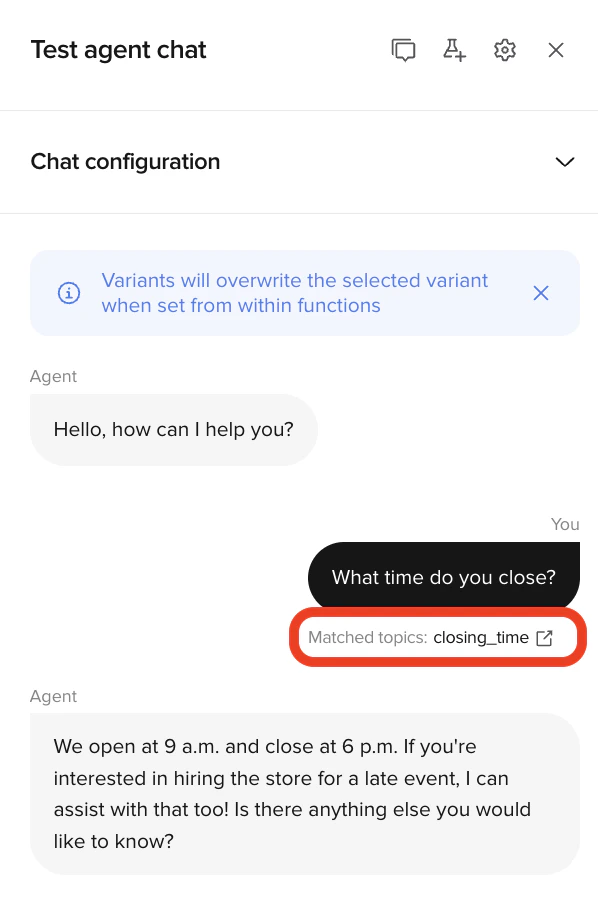
Test in Chat
Ask the question using:- Exact phrasing
- Informal phrasing
- Polite phrasing
- Abrupt phrasing
- The same topic triggers every time
- The response does not change
- No follow-up question is asked
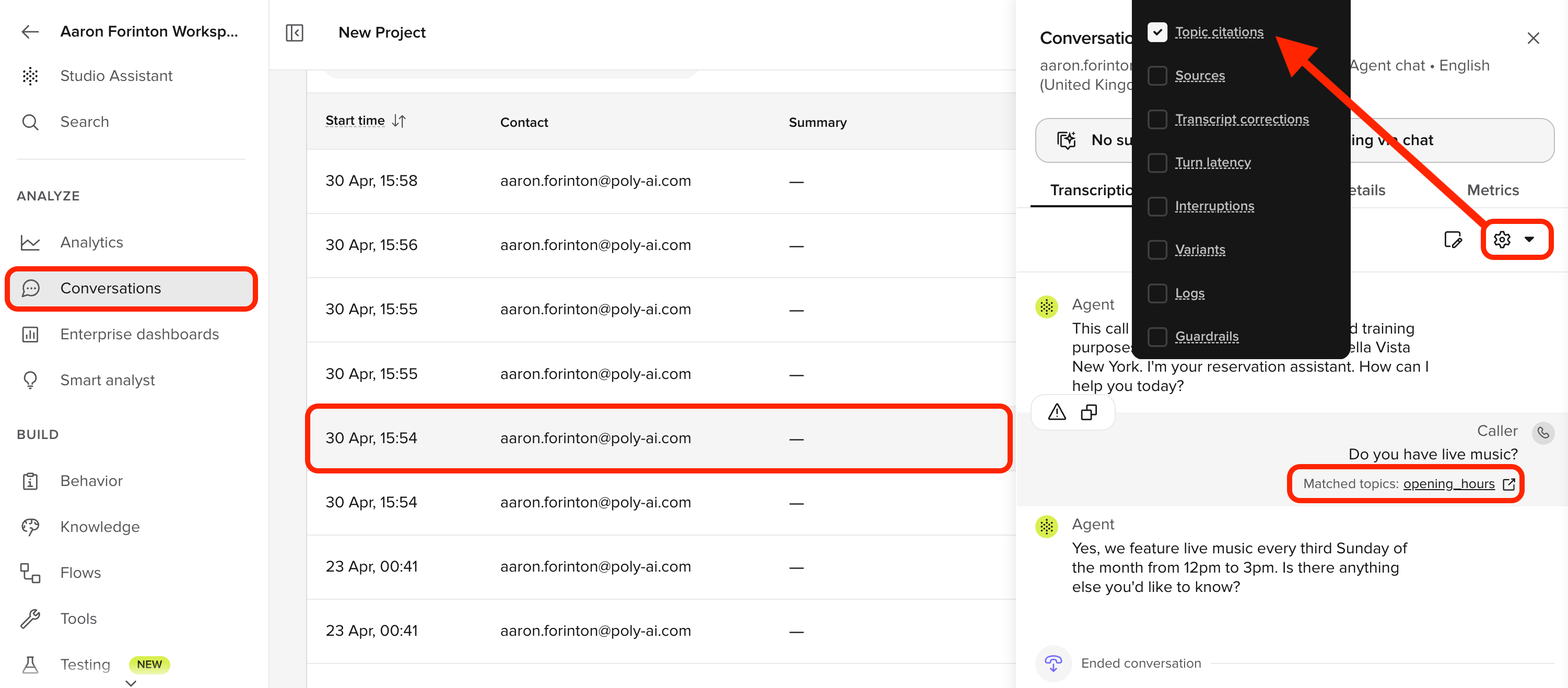
Test in Call
Ask the same question out loud, including hesitation or filler words. Confirm:- Speech is transcribed correctly
- The response sounds natural when spoken
- The agent does not over-explain
Final checklist
Before moving on, confirm:- The topic answers exactly one question
- Sample questions reflect real user phrasing
- Content is short and speakable
- Actions are empty
- The topic behaves the same in Chat and Call
Try it yourself
1
Challenge: Write a pet_policy topic
Write a complete simple topic for a store that allows only service animals.Include:
- Topic name (snake_case)
- Five sample questions
- Content (one to two sentences)
Hint
Hint
The topic name should describe exactly one intent. Sample questions should reflect how real users speak – including informal and spoken phrasing. Content should be speakable and complete in one or two sentences.
Example solution
Example solution
Topic name:
pet_policySample questions:- are pets allowed
- can I bring my dog
- do you allow animals
- is my cat allowed inside
- what’s your policy on pets
Check your understanding
Go deeper
Want the full reference for FAQs? These pages cover everything – including the more complex topics you’ll learn in Level 2:FAQs
Complete reference for creating and managing knowledge topics
Level 2: Complex topics
Multi-turn topics with actions, SMS, and handoffs (coming in Level 2)
← Previous: Edit agent behavior
Lesson 2 of 6
Next: Edit voice settings →
Lesson 4 – choose how your agent sounds