

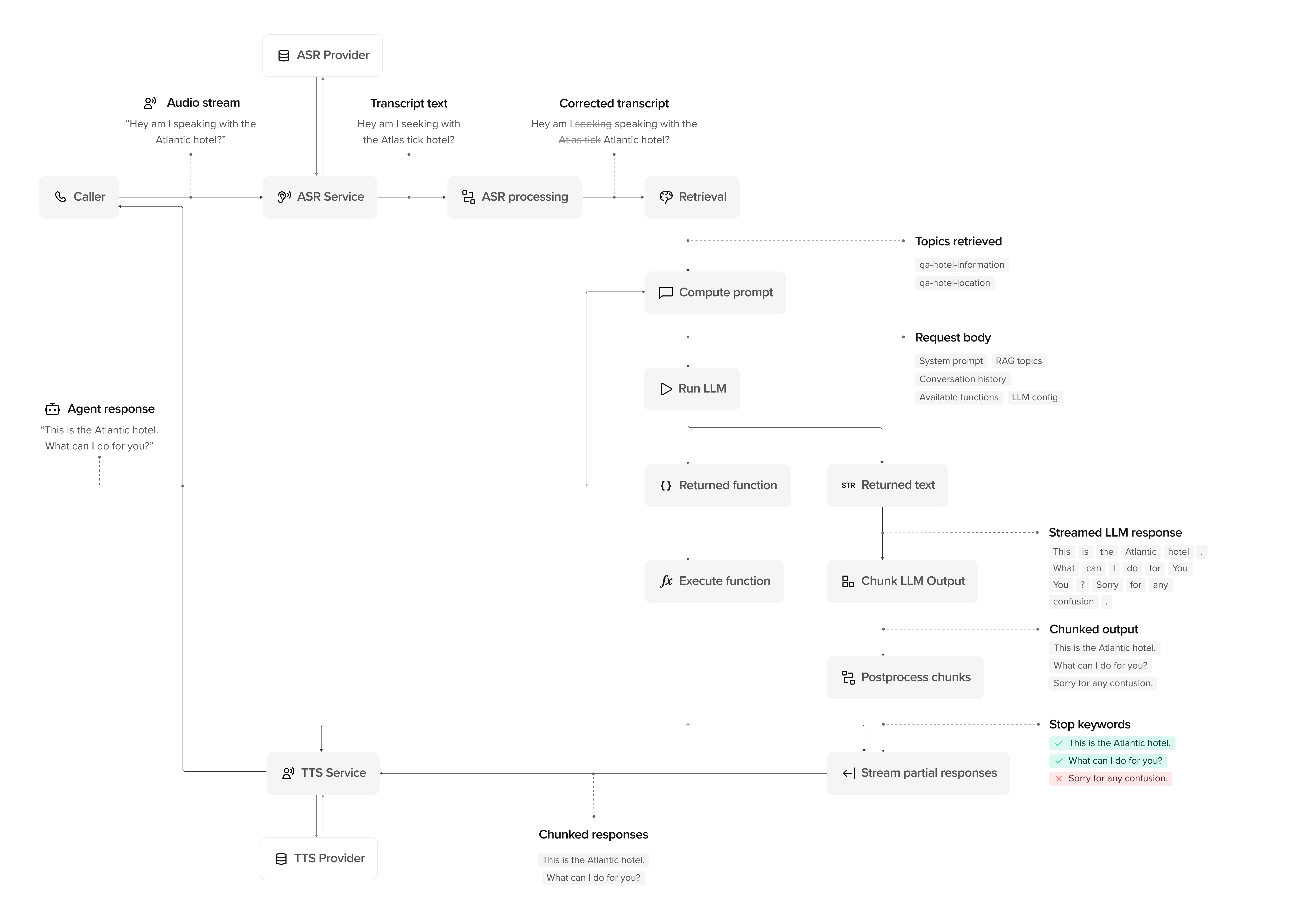
Processing stages
A conversation moves through the following stages:1. Input and processing
1. Input and processing
- User: The user provides input–speech (voice) or text (webchat/SMS).
- Input capture: For voice, the audio stream is captured and sent for transcription. For webchat/SMS, text is received directly.
- ASR Provider (voice only): The system receives the raw audio.
- ASR Service (voice only): Converts the audio into text using automatic speech recognition.
- ASR Processing (voice only): Searches for transcription issues and applies any relevant corrections.
- Transcript/Text → Processed Input: The processed input is passed to Retrieval.
- Retrieval: Pulls relevant topics retrieved from the Knowledge area using RAG (retrieval-augmented generation) to provide context for the response.
2. Compute prompt and generate response
2. Compute prompt and generate response
- Compute Prompt: The system builds an LLM prompt using retrieved topics, system knowledge, and conversation history.
- Run LLM: The LLM processes the request and determines whether to return:
- Returned Text: A direct text response.
- Returned Function: A tool call (if applicable).
- Execute Function (if applicable): Runs the function and passes the result back to the LLM.
- LLM Refinement: If a function result is returned, the LLM updates its response before proceeding.
3. Streaming and chunking
3. Streaming and chunking
- Chunk LLM Output: The response is broken into chunks for delivery.
- Postprocess Chunks: Applies rules such as stop keywords to remove unnecessary phrases.
- Stream Partial Responses: The system sends chunks as soon as they are ready, rather than waiting for the full response.
- TTS Service (voice only): Converts text chunks into speech using text-to-speech synthesis. Configure voices in voice settings.
- Response delivery: For voice, synthesized speech is streamed to the user. For webchat/SMS, text responses are sent directly.
4. Post-processing and handoff
4. Post-processing and handoff
- Live Handoff (if applicable): If escalation is needed, the agent triggers a live handoff. For voice, this transfers the call; for webchat, this can route to a live chat agent.
- Conversation Logs: The system stores conversation history and logs for analytics.
- Final Response: The user receives the completed response as it streams, without waiting for the entire message.
Advanced: How response streaming works
PolyAI agents don’t wait for the full response before speaking. Instead, responses are processed and streamed in real time:- LLM Streaming: Words are generated and sent continuously.
- Chunking: Responses are broken into chunks for controlled delivery.
- Postprocessing: Stop keywords remove unnecessary phrases before delivery.
- Response Streaming: For voice, users hear speech as soon as it’s processed via TTS. For webchat, text appears progressively as it’s generated.
Watch it in action
This video visualizes the conversation flow, showing how responses are processed, chunked, and streamed:Next steps
Architecture overview
Understand system components and data flow
Agent settings
Configure your agent’s personality and behavior
Knowledge setup
Add FAQs and knowledge sources
Keyphrases
Tune ASR and input processing