

You must complete the SMS setup (connect Twilio, create templates) before you can add SMS actions to topics.
How SMS actions work
When a topic with an SMS action is matched, the agent follows your prompt to determine when to send the message. Typically, you instruct the agent to ask for consent before sending – the SMS is not sent automatically just because the topic matches.Adding an SMS trigger
Add an SMS trigger to a topic’s Actions field using any of these methods:- Type
/in the Actions field and select SMS - Right-click in the Actions field and choose SMS from the menu
- Click the + icon on the right side of the field and select SMS
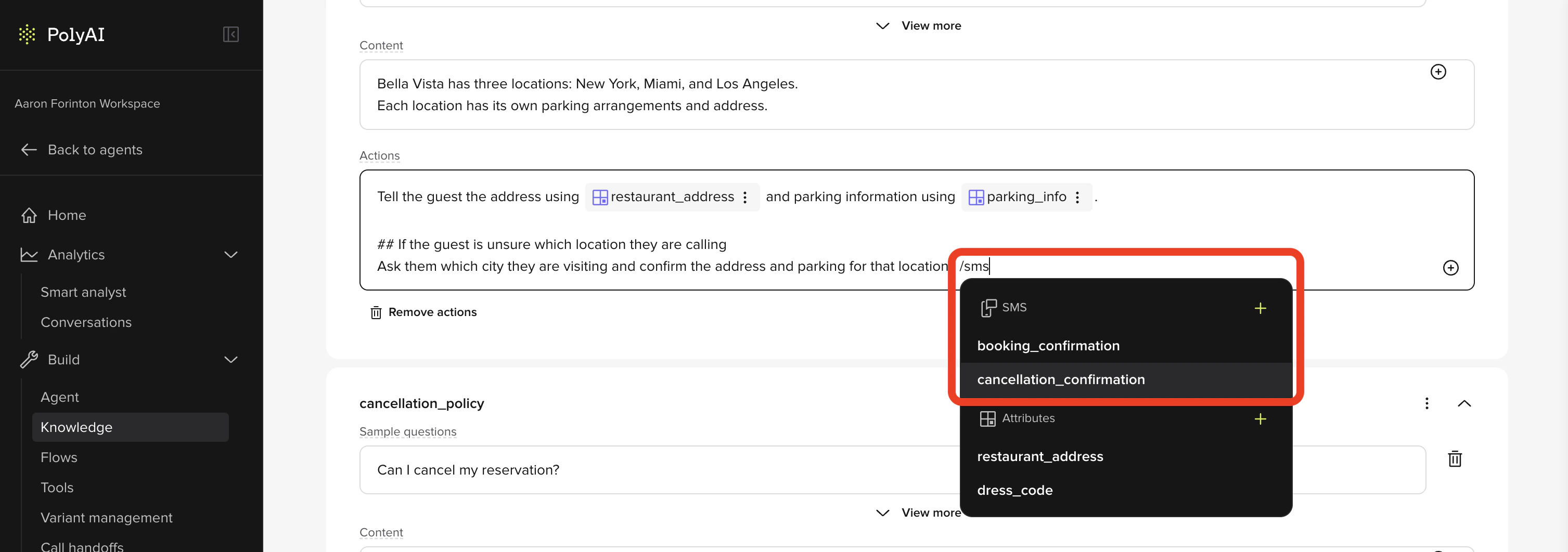
Selecting the SMS template
- After selecting SMS, choose an existing template from the dropdown.
- To create a new template, click + add sms template. You will be redirected to the SMS section (Build > SMS) to define the message content and phone number.
Writing the action prompt
The prompt tells the agent when and how to trigger the SMS. Always include a consent step so the agent asks before sending. Example prompt:Related pages
Handoff actions
Transfer callers to live agents from Managed Topics.
Function invocation
Call custom functions from topic actions.