

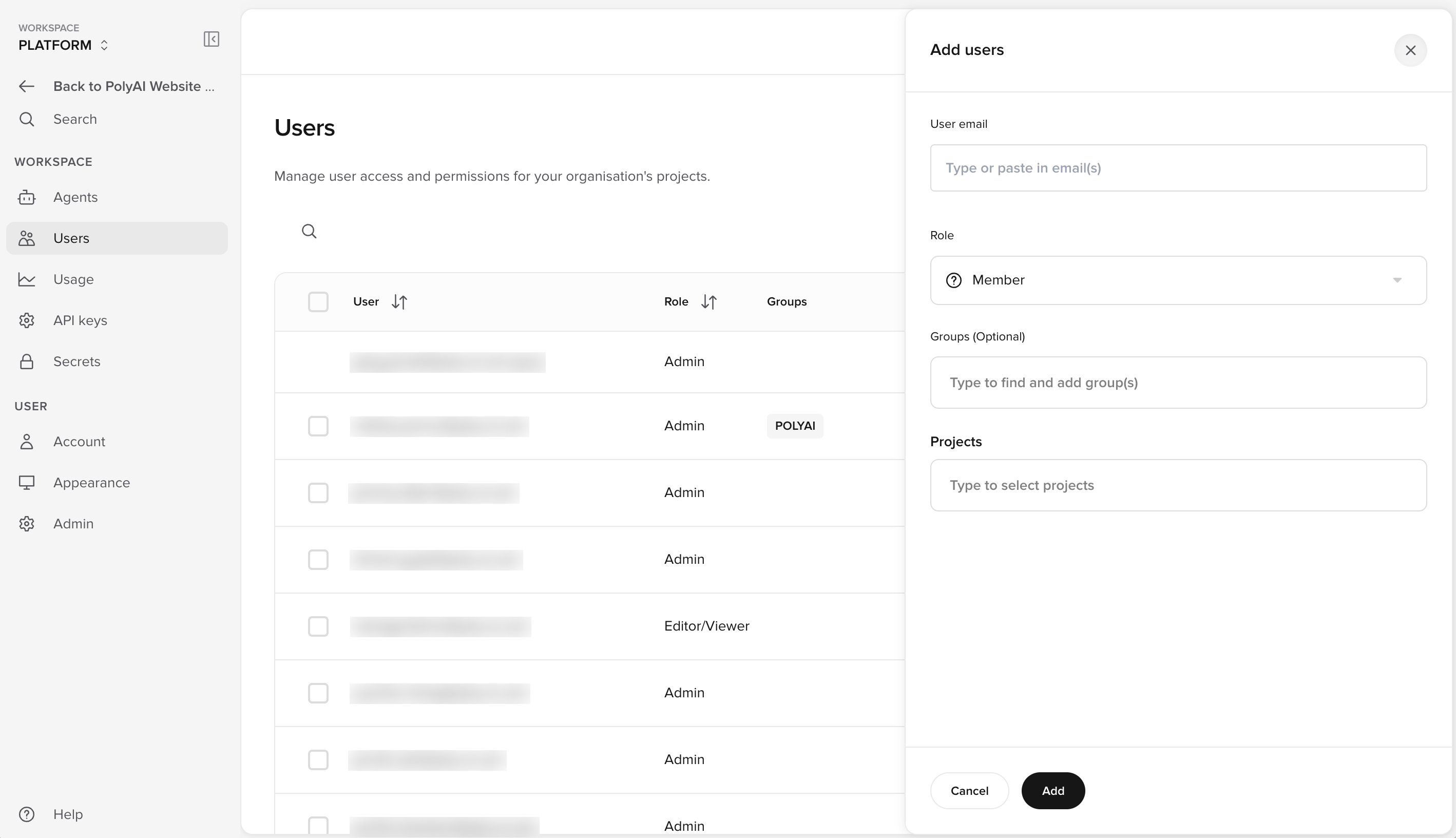
Add users
1
Open the Users page
Click Manage workspace at the bottom of the project sidebar. Then click Users in the Workspace section.
2
Open the Add users panel
Click + User in the top right corner. The Add users panel opens on the right.
3
Enter email addresses
In User email, type or paste one or more email addresses. Separate addresses with a comma, semicolon, space, or new line. Press Enter after each address to add it as a tag.
4
Select a role
In Role, select Admin or Member.
- Admin has full access to every feature and every project. You do not select projects for an Admin.
- Member has access only to the projects that you select in the next steps.
5
Add groups (optional)
In Groups (Optional), type a group name and select it. To create a new group, type a new name and press Enter. Groups are labels only. Groups do not change permissions.
6
Select projects
If the role is Member, type in Projects to find and select each project that the user can open.
7
Set permissions for each project
Each selected project appears as a row. Click the row to expand it. For each area, select None, Read, or Edit. To apply one level to every area, use the All row at the top.
8
Add the users
Click Add. Agent Studio shows a User added message and lists the new users with a Pending tag.
If you enter more than one email address, every user gets the same role, groups, projects, and permissions. To give users different permissions, add them separately or edit them after you add them.
What the new user receives
Each new user receives an invitation email. The invitation link expires 48 hours after Agent Studio sends it. In the Users list, the tag next to the email address shows the invitation status:
Hold the pointer over the tag to see when Agent Studio sent the invitation and when it expires. If an invitation expires, you can re-send it.
After the user accepts the invitation, they sign in at the Agent Studio URL for your region:
Related pages
Manage users
Edit, delete, and export users. Re-send invitations.
Role permissions
Reference for every permission area and level.