> ## Documentation Index
> Fetch the complete documentation index at: https://docs.poly.ai/llms.txt
> Use this file to discover all available pages before exploring further.
# Role permissions
> Reference guide for granular permissions and role-based access control.
Agent Studio offers granular permission control, allowing you to mix access levels across different areas for each user.
 ## Account roles
### Admin
## Account roles
### Admin
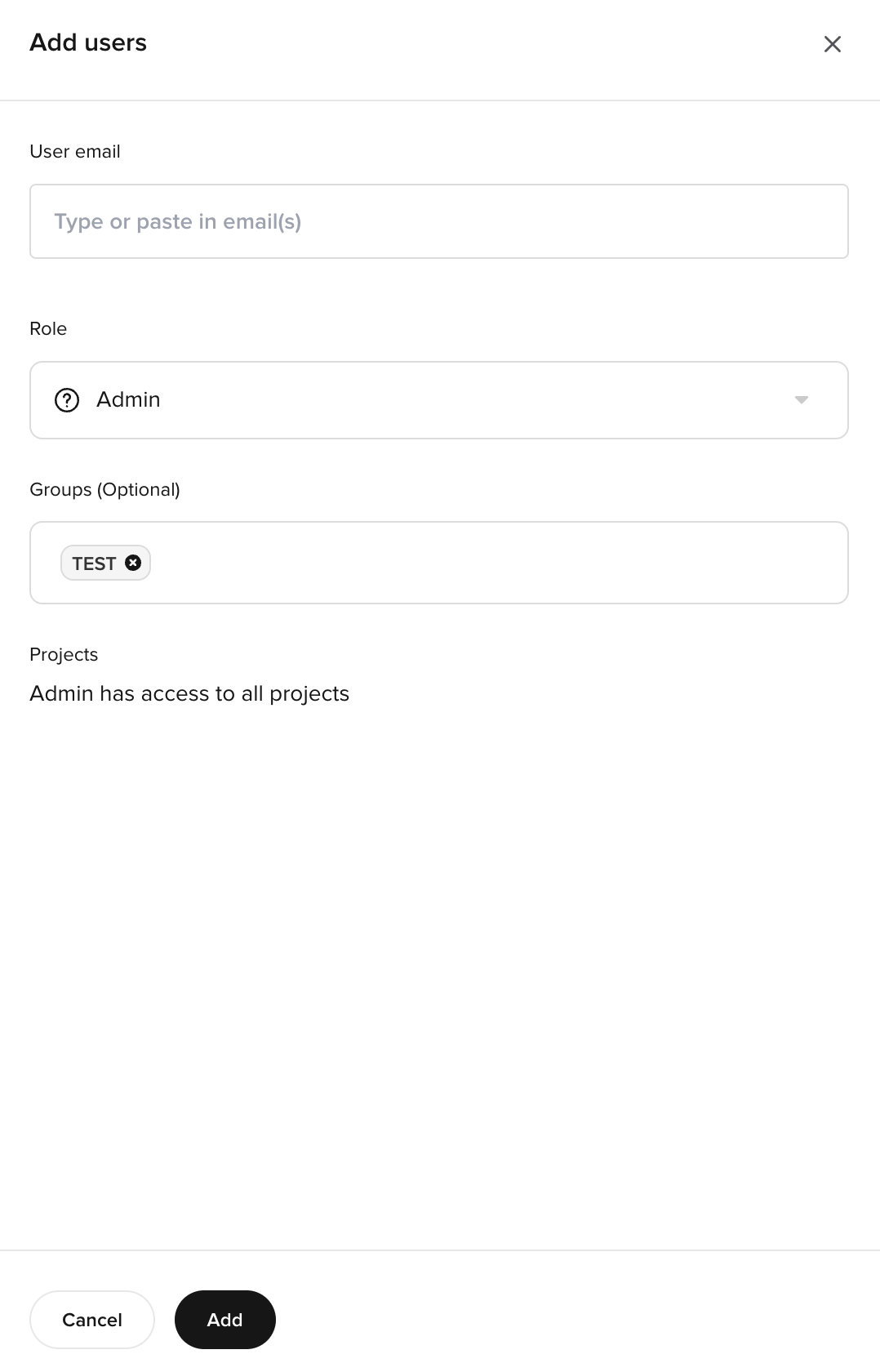 Admins have **full access** to all workspace features:
* Manage all projects and configurations
* Invite and remove users
* Modify user permissions
* Access billing and account settings
* Full edit access to all navigation areas
* Use [Studio Assistant](/studio-assistant/introduction) (Beta) on enterprise clusters
During the Beta, [Studio Assistant](/studio-assistant/introduction) is **available only to project admins** on enterprise clusters. Permissions will become more granular over time.
### Member
Members have **permission-based access** determined by their assigned settings:
* Access controlled per navigation area
* Can have different permission levels for different sections
* Cannot manage other users or account settings
## Permission levels
Admins have **full access** to all workspace features:
* Manage all projects and configurations
* Invite and remove users
* Modify user permissions
* Access billing and account settings
* Full edit access to all navigation areas
* Use [Studio Assistant](/studio-assistant/introduction) (Beta) on enterprise clusters
During the Beta, [Studio Assistant](/studio-assistant/introduction) is **available only to project admins** on enterprise clusters. Permissions will become more granular over time.
### Member
Members have **permission-based access** determined by their assigned settings:
* Access controlled per navigation area
* Can have different permission levels for different sections
* Cannot manage other users or account settings
## Permission levels
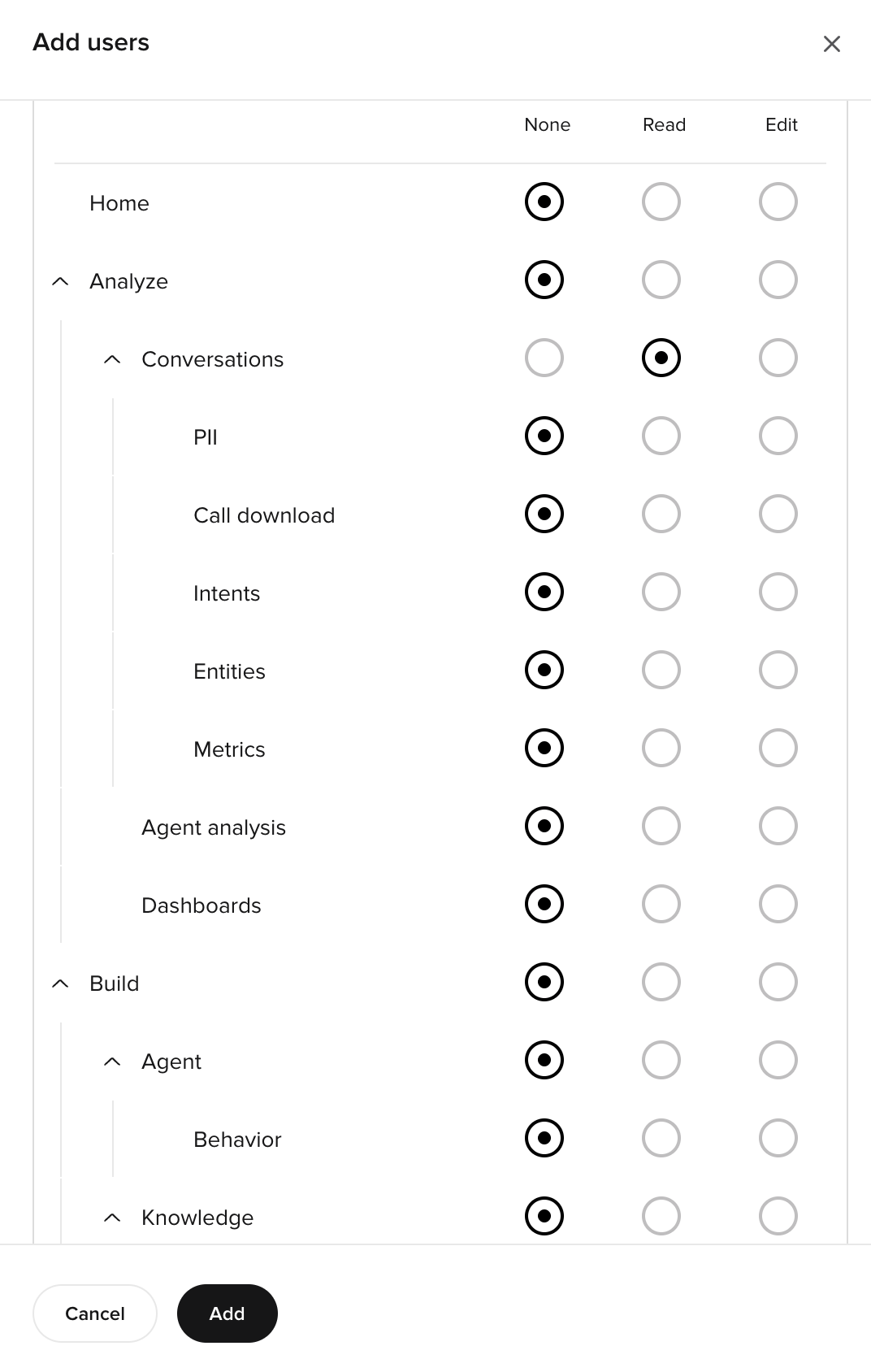 Each navigation area supports three access levels:
| Level | Capabilities |
| -------- | ------------------------------------------------------------ |
| **None** | Area is hidden; user cannot view or access any content |
| **Read** | User can view all content but cannot create, edit, or delete |
| **Edit** | User can view, create, modify, and delete content |
## Navigation areas and sub-sections
### Analytics
Control access to conversation data and analysis tools.
| Sub-section | Controls |
| -------------- | ------------------------------------------------- |
| Conversations | Call transcripts, recordings, and review |
| KPIs | Custom metric definitions |
| Custom metrics | Post-call reporting and extraction queries |
| Dashboards | Standard, safety, and custom analytics dashboards |
| PolyScore | Automated conversation scoring |
| Smart Analyst | AI-powered conversation insights |
| Agent analysis | Per-call categorization and trends |
| CSAT | Customer satisfaction surveys |
### Behavior
Control access to agent personality, language, guardrails, and model selection.
| Sub-section | Controls |
| ----------- | ---------------------------------------------- |
| General | Agent persona, role, and rules |
| Language | Multilingual settings, coverage, translations |
| Guardrails | Safety filters and built-in guardrails |
| Models | Model selection (Raven, OpenAI, Bedrock, BYOM) |
### Knowledge
Control access to FAQs, external sources, and variants.
| Sub-section | Controls |
| ----------- | -------------------------------------------------- |
| FAQs | Curated topics, sample questions, answers, actions |
| Sources | Connected knowledge integrations |
| Variants | Multi-site configurations |
### Flows
Control access to conversation flow design (no-code and code-based).
### Tools
Control access to custom Python functions, classes, and tool integrations.
### Testing
Control access to test cases, test sets, and regression runs.
### Real-time config
Control access to real-time config tools and the configuration builder.
### Voice
Control access to all voice channel settings.
| Sub-section | Controls |
| ------------- | ---------------------------------------------------------------------------------- |
| Agent | Agent voice and disclaimer |
| Handoffs | Transfer destinations and routing |
| Audio library | Pre-recorded audio assets |
| Numbers | Phone number management, Twilio integration |
| Advanced | Call settings, speech recognition, response control, stop keywords, pronunciations |
### Messaging
Control access to chat and SMS settings.
| Sub-section | Controls |
| ----------- | ------------------------------------------------------------------------ |
| Chat | Chat configuration and widget settings (these share a single permission) |
| SMS | Outbound SMS configuration |
### Integrations
Control access to API integrations, third-party service connections, and MCP.
### Deployments
Control access to environment and version management.
| Sub-section | Controls |
| ---------------- | ------------------------------------ |
| Environments | Sandbox, Pre-release, Live promotion |
| A/B testing | Traffic splits and experiments |
| Compare versions | Side-by-side diffs |
| Project history | Version history and comparisons |
### Widgets
Control access to phone and chat widget configuration, installation, and sharing.
### Account
Control access to account settings, users, API keys, call data, and legal.
## Setting permissions
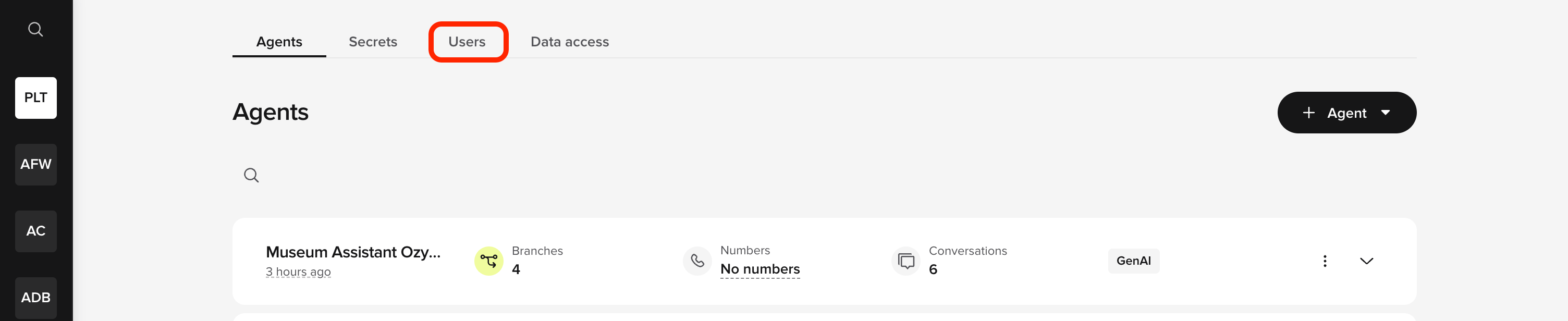
1. Go to the **Users** tab on the workspace homepage.
2. Select a user or click **Invite** for new users.
3. For each navigation area, select **None**, **Read**, or **Edit**.
4. Expand sections for more granular control.
5. Save changes.
Start with broad area permissions, then expand sections to fine-tune access where needed.
## Common configurations
Each navigation area supports three access levels:
| Level | Capabilities |
| -------- | ------------------------------------------------------------ |
| **None** | Area is hidden; user cannot view or access any content |
| **Read** | User can view all content but cannot create, edit, or delete |
| **Edit** | User can view, create, modify, and delete content |
## Navigation areas and sub-sections
### Analytics
Control access to conversation data and analysis tools.
| Sub-section | Controls |
| -------------- | ------------------------------------------------- |
| Conversations | Call transcripts, recordings, and review |
| KPIs | Custom metric definitions |
| Custom metrics | Post-call reporting and extraction queries |
| Dashboards | Standard, safety, and custom analytics dashboards |
| PolyScore | Automated conversation scoring |
| Smart Analyst | AI-powered conversation insights |
| Agent analysis | Per-call categorization and trends |
| CSAT | Customer satisfaction surveys |
### Behavior
Control access to agent personality, language, guardrails, and model selection.
| Sub-section | Controls |
| ----------- | ---------------------------------------------- |
| General | Agent persona, role, and rules |
| Language | Multilingual settings, coverage, translations |
| Guardrails | Safety filters and built-in guardrails |
| Models | Model selection (Raven, OpenAI, Bedrock, BYOM) |
### Knowledge
Control access to FAQs, external sources, and variants.
| Sub-section | Controls |
| ----------- | -------------------------------------------------- |
| FAQs | Curated topics, sample questions, answers, actions |
| Sources | Connected knowledge integrations |
| Variants | Multi-site configurations |
### Flows
Control access to conversation flow design (no-code and code-based).
### Tools
Control access to custom Python functions, classes, and tool integrations.
### Testing
Control access to test cases, test sets, and regression runs.
### Real-time config
Control access to real-time config tools and the configuration builder.
### Voice
Control access to all voice channel settings.
| Sub-section | Controls |
| ------------- | ---------------------------------------------------------------------------------- |
| Agent | Agent voice and disclaimer |
| Handoffs | Transfer destinations and routing |
| Audio library | Pre-recorded audio assets |
| Numbers | Phone number management, Twilio integration |
| Advanced | Call settings, speech recognition, response control, stop keywords, pronunciations |
### Messaging
Control access to chat and SMS settings.
| Sub-section | Controls |
| ----------- | ------------------------------------------------------------------------ |
| Chat | Chat configuration and widget settings (these share a single permission) |
| SMS | Outbound SMS configuration |
### Integrations
Control access to API integrations, third-party service connections, and MCP.
### Deployments
Control access to environment and version management.
| Sub-section | Controls |
| ---------------- | ------------------------------------ |
| Environments | Sandbox, Pre-release, Live promotion |
| A/B testing | Traffic splits and experiments |
| Compare versions | Side-by-side diffs |
| Project history | Version history and comparisons |
### Widgets
Control access to phone and chat widget configuration, installation, and sharing.
### Account
Control access to account settings, users, API keys, call data, and legal.
## Setting permissions
1. Go to the **Users** tab on the workspace homepage.
2. Select a user or click **Invite** for new users.
3. For each navigation area, select **None**, **Read**, or **Edit**.
4. Expand sections for more granular control.
5. Save changes.
Start with broad area permissions, then expand sections to fine-tune access where needed.
## Common configurations
 ### Read-only reviewer
```
Analytics: Read
Behavior: Read
Knowledge: Read
Voice: Read
Messaging: Read
Deployments: Read
Account: Read
```
### Knowledge editor
```
Analytics: Read
Knowledge: Edit
Behavior: Read
Voice: Read
Messaging: Read
Deployments: None
Account: None
```
### Full developer
```
Analytics: Edit
Behavior: Edit
Knowledge: Edit
Flows: Edit
Tools: Edit
Voice: Edit
Messaging: Edit
Integrations: Edit
Deployments: Edit
Account: Read
```
### Operations manager
```
Analytics: Edit
Behavior: Read
Knowledge: Read
Voice: Read
Messaging: Read
Deployments: Edit
Account: Edit
```
## Permission inheritance
* If a parent area is set to **None**, all sub-sections are inaccessible
* Setting a parent area to **Edit** grants edit access to all sub-sections unless overridden
* Sub-section permissions can be more restrictive than the parent, but not less restrictive
## Related pages
Getting started with permissions and account-level roles.
Add new team members with role-based access control.
### Read-only reviewer
```
Analytics: Read
Behavior: Read
Knowledge: Read
Voice: Read
Messaging: Read
Deployments: Read
Account: Read
```
### Knowledge editor
```
Analytics: Read
Knowledge: Edit
Behavior: Read
Voice: Read
Messaging: Read
Deployments: None
Account: None
```
### Full developer
```
Analytics: Edit
Behavior: Edit
Knowledge: Edit
Flows: Edit
Tools: Edit
Voice: Edit
Messaging: Edit
Integrations: Edit
Deployments: Edit
Account: Read
```
### Operations manager
```
Analytics: Edit
Behavior: Read
Knowledge: Read
Voice: Read
Messaging: Read
Deployments: Edit
Account: Edit
```
## Permission inheritance
* If a parent area is set to **None**, all sub-sections are inaccessible
* Setting a parent area to **Edit** grants edit access to all sub-sections unless overridden
* Sub-section permissions can be more restrictive than the parent, but not less restrictive
## Related pages
Getting started with permissions and account-level roles.
Add new team members with role-based access control.