> ## Documentation Index
> Fetch the complete documentation index at: https://docs.poly.ai/llms.txt
> Use this file to discover all available pages before exploring further.
# ASR biasing
> Configure flow steps to improve speech recognition accuracy for structured inputs like codes and names.
**This page covers flow-level ASR configuration.** For dynamic ASR biasing from Python functions, see [`conv.set_asr_biasing()`](/tools/classes/conv-object). Setting up ASR biasing in the flow editor does not require code.
Automatic Speech Recognition (ASR) biasing helps the agent better understand the type of input it expects in each step. It nudges transcription toward expected patterns — like confirmation codes, personal names, or dates — instead of treating every utterance as free text.
Enable it on any **flow step** that collects structured input.
## When to use it
The user is likely to say a booking code, date, or other structured value.
You see transcription errors on names, codes, or numbers.
The agent is guessing incorrectly from noisy or accented audio.
## Bias options
Pick the bias that matches what the user is about to say — not the wording of the prompt.
| Option | Use for | Example utterance |
| ----------------- | ------------------------------------------ | ---------------------------------- |
| **Alphanumeric** | Booking references, confirmation codes | *"X9C7G2"* |
| **Name** | Full personal names — first, last, or both | *"Aaron Forinton"* |
| **Name spelling** | Phonetically spelled names | *"A for apple, R for Robert…"* |
| **Numeric** | Ages, short numbers | *"forty-two"* |
| **Party size** | Group bookings | *"a table for four"* |
| **Precise date** | Specific calendar dates | *"March 14th"* |
| **Relative date** | Flexible time references | *"next Tuesday"*, *"in two weeks"* |
| **Single number** | One-digit responses, menu selection | *"press 1"* / *"one"* |
| **Time** | Spoken times | *"half past eight"* |
| **Yes/No** | Confirmation responses | *"yeah, that's right"* |
| **Address** | Location names, postcodes, street numbers | *"221B Baker Street, NW1 6XE"* |
Custom keyword fields can also be added to bias transcription toward domain-specific vocabulary — product names, menu items, medical terms, and so on.
Steps with ASR biasing already applied are marked with the ear icon in the Flow Editor.
## Configure it on a step
In the Flow Editor, select the step where you want to bias transcription and open the step editor on the right.
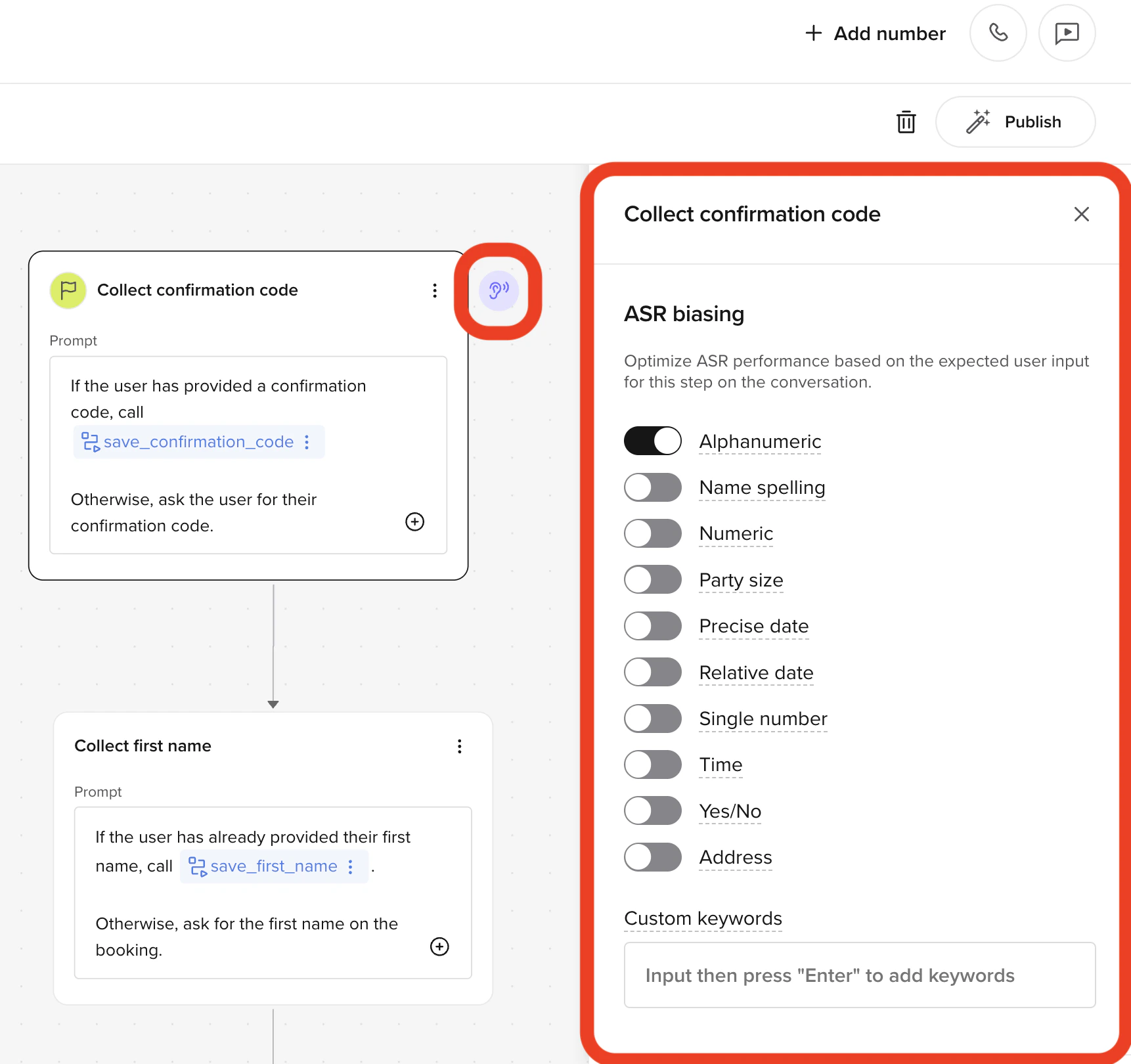 In the **ASR biasing** panel, toggle on the option that matches what the user is expected to say (see the table above).
Add domain-specific vocabulary as custom keywords — product names, menu items, dish names, medical terms. Bias applies on top of the selected input type.
Place a test call and confirm the transcription matches what was said. Iterate on the bias type and keywords if not.
## Example: confirmation code capture
In the [reservation confirmation flow example](./example#e-asr-biasing), the agent collects a booking code. Users say mixed letters and numbers, so **Alphanumeric** biasing is toggled on — this raises the likelihood that utterances like *"X9C7G2"* are transcribed accurately instead of being interpreted as ordinary words.
**Combine with [few-shot prompting](./few-shot-prompting)** when the input format is ambiguous — for example, when users might say a code as *"X nine C seven G two"* or *"X9C7G2"* interchangeably. Bias handles the acoustic model, few-shot prompting handles the LLM's interpretation of the result.
Match the bias to the expected **input**, not the wording of the prompt. Biasing a "yes/no" prompt with **Alphanumeric** hurts recognition of *"yes"* and *"no"*.
In the **ASR biasing** panel, toggle on the option that matches what the user is expected to say (see the table above).
Add domain-specific vocabulary as custom keywords — product names, menu items, dish names, medical terms. Bias applies on top of the selected input type.
Place a test call and confirm the transcription matches what was said. Iterate on the bias type and keywords if not.
## Example: confirmation code capture
In the [reservation confirmation flow example](./example#e-asr-biasing), the agent collects a booking code. Users say mixed letters and numbers, so **Alphanumeric** biasing is toggled on — this raises the likelihood that utterances like *"X9C7G2"* are transcribed accurately instead of being interpreted as ordinary words.
**Combine with [few-shot prompting](./few-shot-prompting)** when the input format is ambiguous — for example, when users might say a code as *"X nine C seven G two"* or *"X9C7G2"* interchangeably. Bias handles the acoustic model, few-shot prompting handles the LLM's interpretation of the result.
Match the bias to the expected **input**, not the wording of the prompt. Biasing a "yes/no" prompt with **Alphanumeric** hurts recognition of *"yes"* and *"no"*.