> ## Documentation Index
> Fetch the complete documentation index at: https://docs.poly.ai/llms.txt
> Use this file to discover all available pages before exploring further.
# Studio transcripts
> Access conversation transcripts and recordings directly in Agent Studio for compliance, QA, and analysis.
Access transcripts and recordings in **Analytics > Conversations > Voice** (for voice calls) or **Analytics > Conversations > Web chat** (for webchat sessions) for manual review of conversation quality and customer interactions. For API access, see [List Conversations](/call-data/conversations-api/list-conversations).
See [Conversation review](/analytics/conversations/review) for detailed analysis workflows.
## Accessing transcripts in the PolyAI Studio
To view conversation transcripts:
1. Go to **Analytics > Conversations > Voice** (for voice calls) or **Analytics > Conversations > Web chat** (for webchat sessions) in PolyAI Studio.
2. Click **Filter** and add filters based on your search criteria. Available filters include:
* **Call handoff** -- Identify conversations involving handoff events.
* **Duration** -- Filter calls by duration length.
* **Tool calls** -- Search interactions where specific tools were invoked.
* **Function calls** -- Find conversations where a specific function ran (filter by function name, or filter by *exists* to find any conversation that ran a function).
* **SMS events** -- Find conversations where an SMS was sent. Filter by SMS event name, or use *exists* to surface every call that triggered an SMS.
* **Phone number** -- Filter by the caller's or recipient's phone number.
* **Safety flag** -- Identify flagged conversations.
* **Start date** -- Set a date range for the search.
* **Environment** -- Filter by environment type, such as Sandbox or Production.
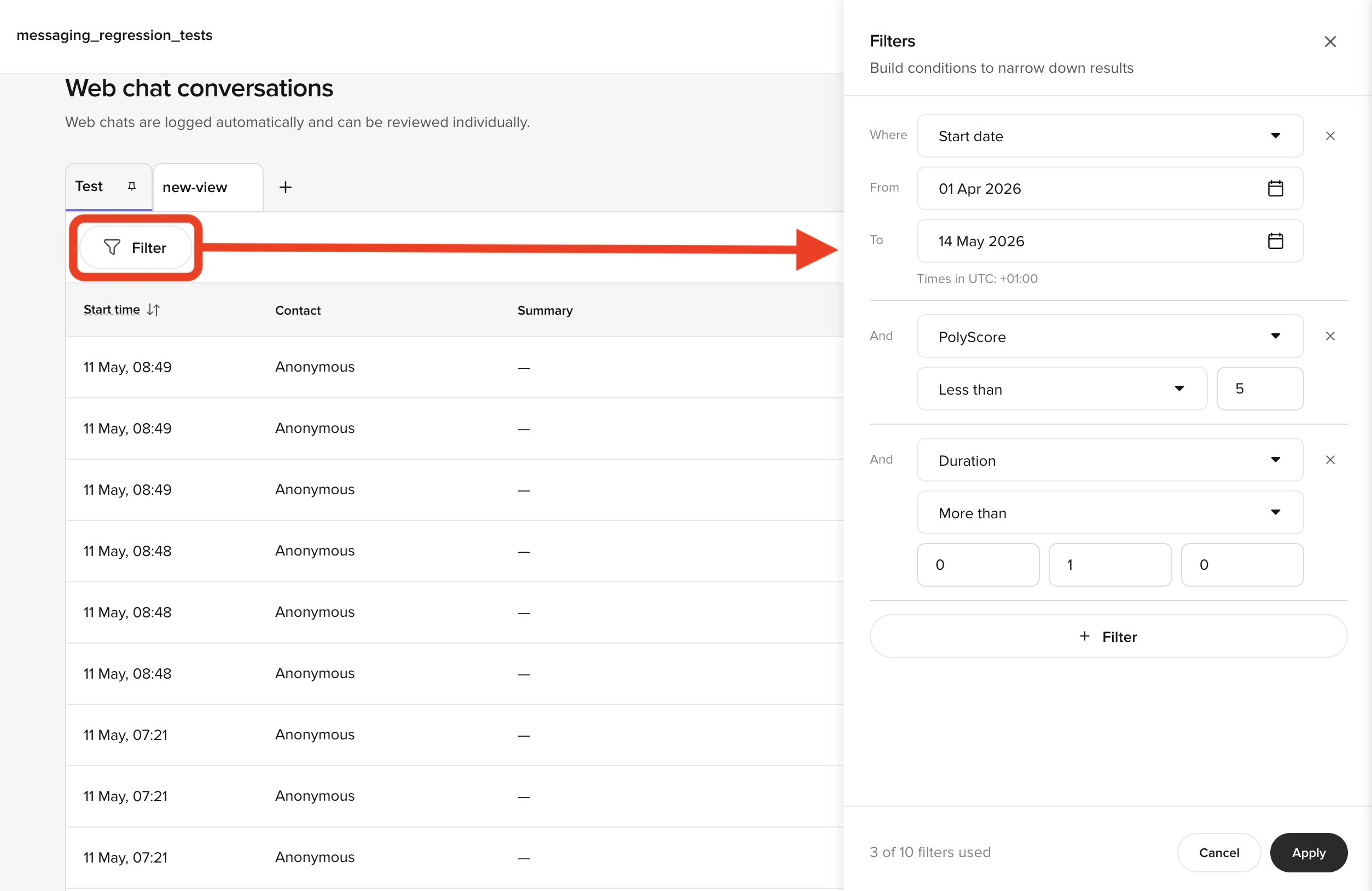 3. Select a conversation from the results to open its details, including transcript and audio playback.
### Transcript details
Each transcript includes the following details:
* **Metadata**
* Start and end times, call duration, and environment (e.g., Sandbox or Production).
* Call SID and phone numbers for both caller and recipient.
* **Speaker segmentation**
* Clear differentiation between customer and agent speech, with timestamps for each utterance.
* **Handoff information**
* Transition details for live agent handoffs, such as handoff state and timestamps.
* **Audio playback**
* Play and review call recordings directly in **Conversation review**.
* **Conversation analysis**
* Includes toggles for viewing **Tool calls**, **Topic citations**, **Flows and steps**, and **Variables** for deeper interaction insights.
## Related pages
Retrieve metadata for conversations programmatically.
Monitor and manage live agent transitions.
Set up bulk synchronization of recordings and transcripts.
## PolyScore
3. Select a conversation from the results to open its details, including transcript and audio playback.
### Transcript details
Each transcript includes the following details:
* **Metadata**
* Start and end times, call duration, and environment (e.g., Sandbox or Production).
* Call SID and phone numbers for both caller and recipient.
* **Speaker segmentation**
* Clear differentiation between customer and agent speech, with timestamps for each utterance.
* **Handoff information**
* Transition details for live agent handoffs, such as handoff state and timestamps.
* **Audio playback**
* Play and review call recordings directly in **Conversation review**.
* **Conversation analysis**
* Includes toggles for viewing **Tool calls**, **Topic citations**, **Flows and steps**, and **Variables** for deeper interaction insights.
## Related pages
Retrieve metadata for conversations programmatically.
Monitor and manage live agent transitions.
Set up bulk synchronization of recordings and transcripts.
## PolyScore
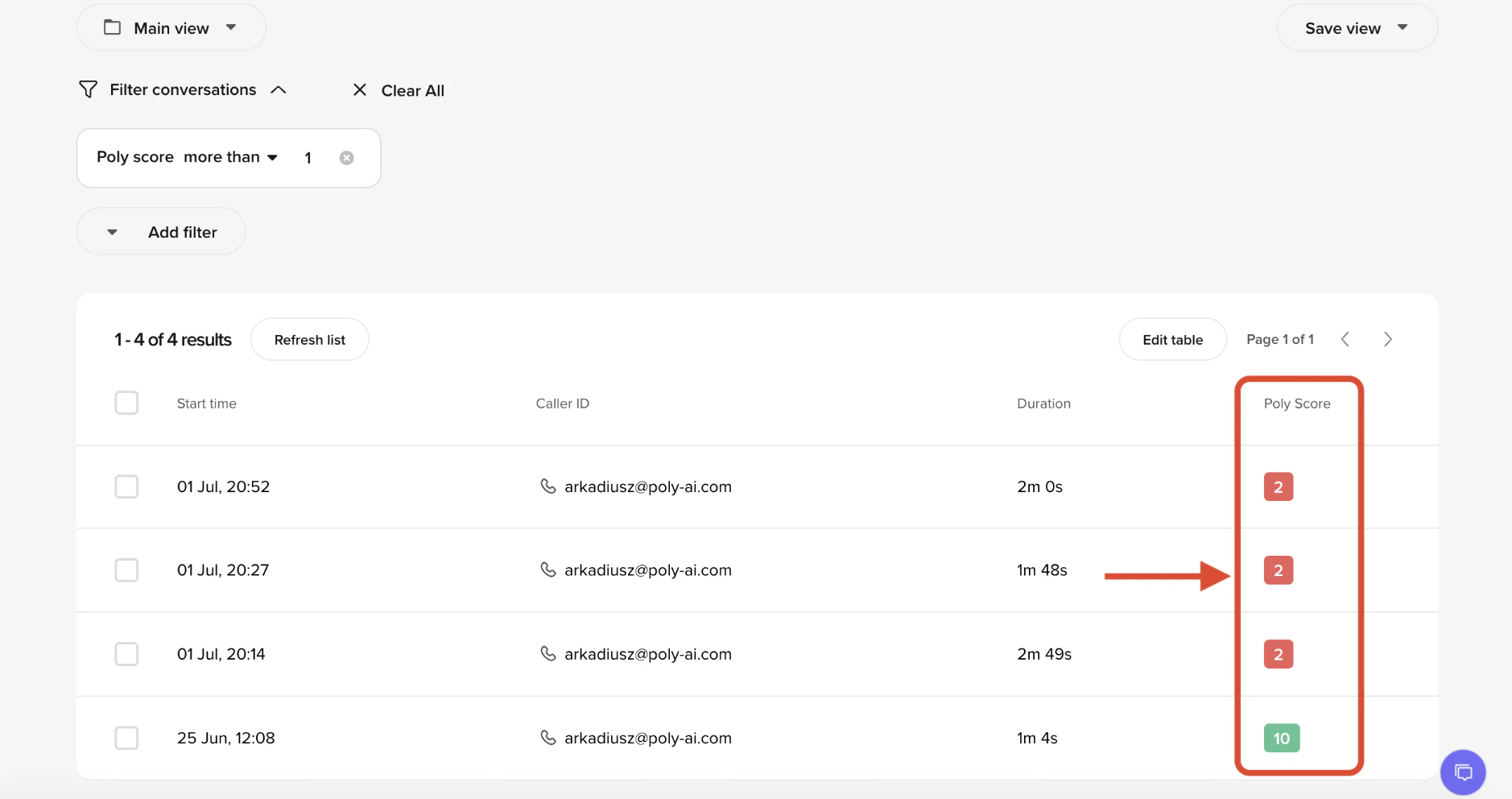 **PolyScore** is an automated 0–10 quality rating shown for every eligible voice call. It evaluates conversation quality, task success, and customer experience to help you quickly identify strong and weak conversations.
For full details on how scoring works, dimensions, limitations, and interpretation guidance, see the dedicated [PolyScore](/analytics/polyscore) page.
## Call summaries
Call summaries are AI-generated overviews of conversation content, key topics discussed, and outcomes. They appear alongside the transcript in Conversation Review.
**PolyScore** is an automated 0–10 quality rating shown for every eligible voice call. It evaluates conversation quality, task success, and customer experience to help you quickly identify strong and weak conversations.
For full details on how scoring works, dimensions, limitations, and interpretation guidance, see the dedicated [PolyScore](/analytics/polyscore) page.
## Call summaries
Call summaries are AI-generated overviews of conversation content, key topics discussed, and outcomes. They appear alongside the transcript in Conversation Review.